
Hiding folders in the ide

Can someone from NetMake please answer why they said this issue was solved but it’s still present? Also, will they ever fix it?

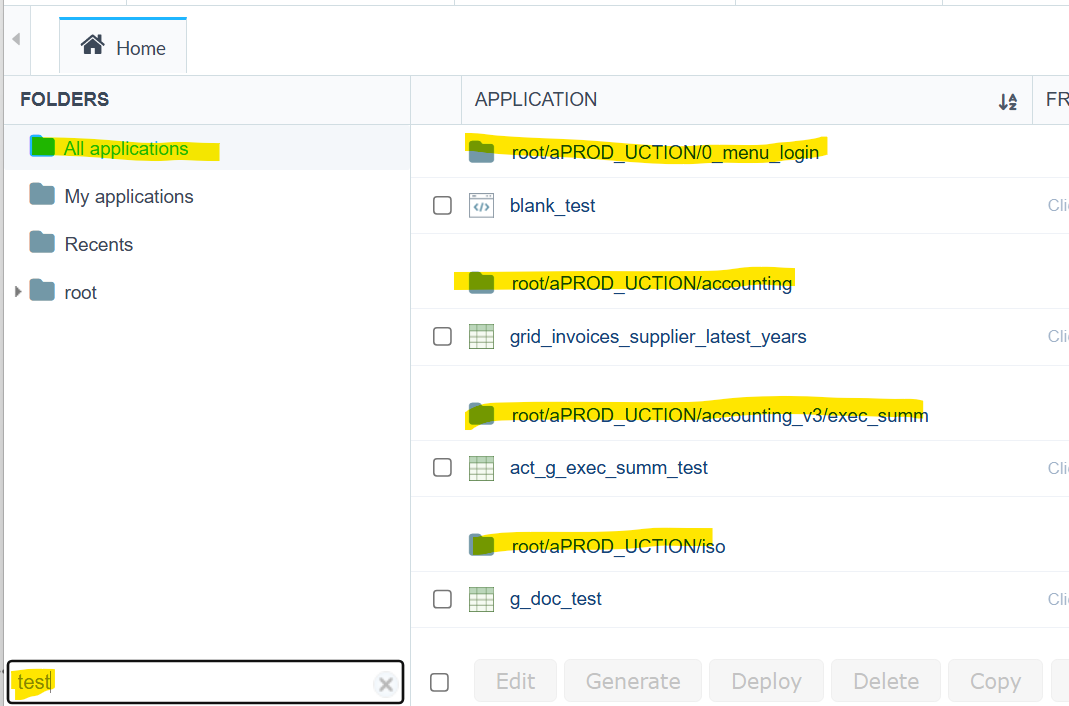
The issue is that folders are always visible in the right pane, making sorting by any field impossibile because applications are always grouped by folder.

I’m on the latest version: 9.13.014 (5)

There is a checkbox in Options > My ScriptCase named:

“Display subfolders in the application list”

But enabling\disabling it doesn’t seem to have any effect at all.

I chatted with a support representative, and they told me they hadn’t received any complaints about this issue.

It’s unbelievable; I thought it was just my problem, but I see that many people are dealing with it and having problems with it.

+1 . I have the same problem. Also Recents it’s not working than previous versions.

Same here…

@robertoferraz @Danilo_Lima

can we get any feedback please?

you told us this was fixed months ago:
[SOLVED] Hiding folders in the ide in 9.12.023 - Scriptcase 9 / General - Scriptcase Low-code

but it’s still not working

I’m seeing the exact same thing on my end. It’s frustrating because that ‘Display subfolders’ toggle in the settings feels like it’s just there for decoration right now. When you have a lot of apps, not being able to flatten the list to sort by ‘Last Modified’ or ‘Type’ really slows down the workflow.

Hello everyone!

First of all, we apologize for the problem you’re experiencing.

We have already identified the issue and reported it, requesting priority in its resolution, as the disabled option is only taking effect when accessing “root” and other user-created folders.

In “All applications” and “My applications,” the folders continue to be displayed.

As soon as we receive feedback on this, we will provide an update through this thread.

Best regards!