
Create a super modern layout easily using AdminLTE

Hey everyone,

If you’re looking to give your projects a fresh, sleek, and ultra-modern look without spending days on custom frontend styling, you can easily build a top-tier UI using a clean AdminLTE-based layout structure.

Here is a quick setup featuring a responsive sidebar, a smooth dynamic content area, a built-in dark/light mode toggle, a live clock, and a clean top navbar with quick access icons and user profile support.
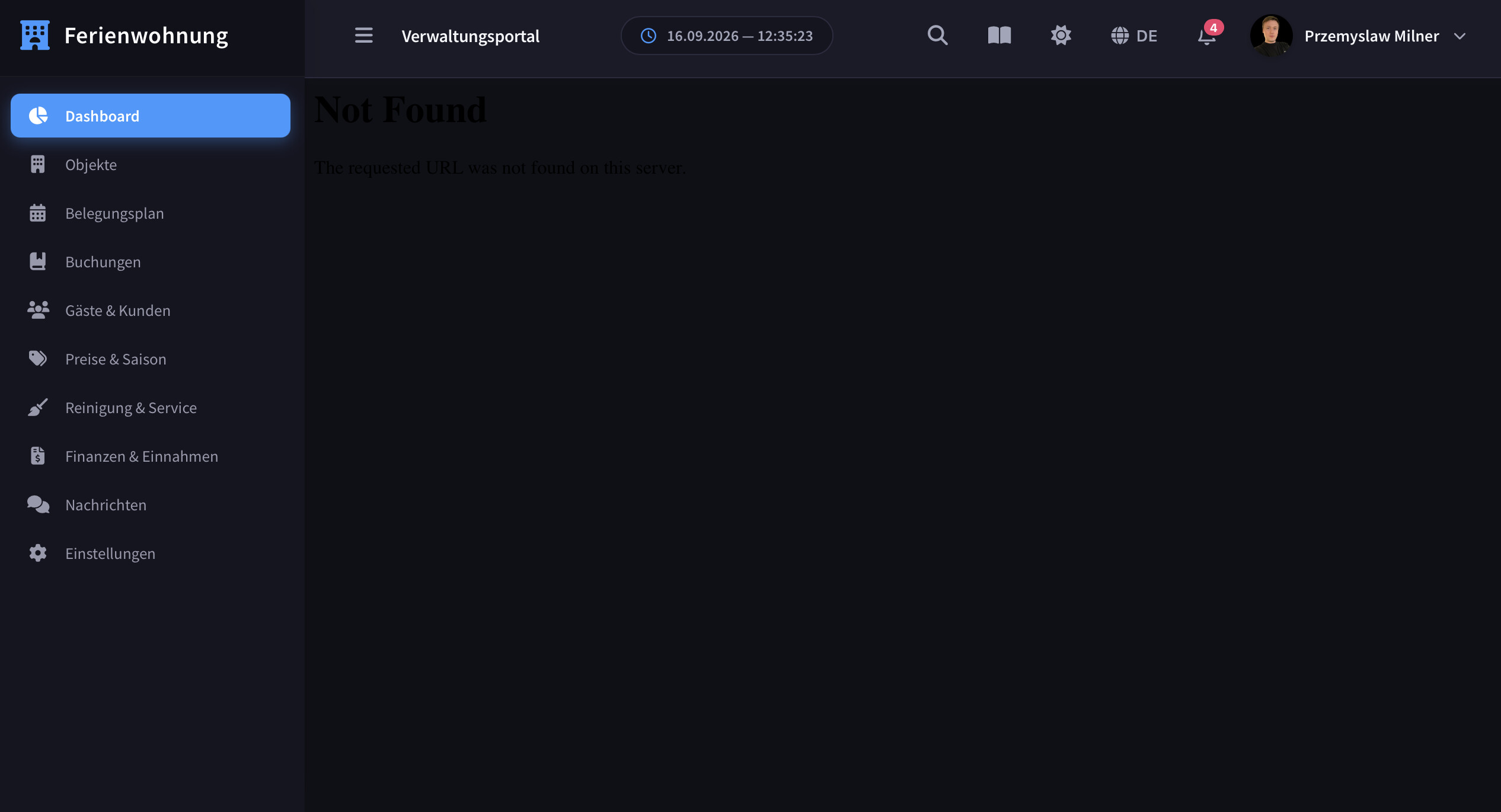

Feel free to adapt and use this skeleton for your own dashboards and web applications:

echo <<<HTML

Dashboard :root { --sidebar-bg: #1e1e2d; --sidebar-color: #a2a5b9; --sidebar-hover-bg: rgba(255, 255, 255, 0.06); --sidebar-hover-color: #ffffff; --sidebar-active-bg: #3699ff; --sidebar-active-color: #ffffff; --content-bg: #f4f6f9; --navbar-bg: #ffffff; --navbar-border: #edf2f7; --text-main: #181c32; --clock-bg: #f8fafc; --clock-border: #e2e8f0; --clock-text: #475569; }
    body.dark-mode {
        --sidebar-bg: #151521;
        --sidebar-color: #9899ac;
        --sidebar-hover-bg: rgba(255, 255, 255, 0.04);
        --sidebar-hover-color: #ffffff;
        --sidebar-active-bg: #3699ff;
        --sidebar-active-color: #ffffff;
        --content-bg: #0f1016;
        --navbar-bg: #1b1b28;
        --navbar-border: #2b2b40;
        --text-main: #f3f6f9;
        --clock-bg: #151521;
        --clock-border: #2b2b40;
        --clock-text: #a2a5b9;
    }

    body, html {
        margin: 0; padding: 0; height: 100%; width: 100%;
        font-family: 'Source Sans Pro', sans-serif;
        background-color: var(--content-bg);
        overflow: hidden;
        transition: background-color 0.3s ease;
    }

    .wrapper { display: flex; height: 100vh; width: 100vw; position: relative; }

    .main-sidebar {
        width: 260px; background-color: var(--sidebar-bg); color: var(--sidebar-color);
        display: flex; flex-direction: column; z-index: 1000; flex-shrink: 0;
        box-shadow: 4px 0 24px rgba(0, 0, 0, 0.06); height: 100vh;
    }

    .brand-link {
        padding: 22px 20px; font-size: 1.25rem; font-weight: 600; color: #ffffff;
        text-decoration: none; display: flex; align-items: center; gap: 12px;
        background-color: rgba(0,0,0,0.18); border-bottom: 1px solid rgba(255, 255, 255, 0.04);
    }
    .brand-link i { color: #3699ff; }

    .sidebar-menu { list-style: none; padding: 14px 12px; margin: 0; overflow-y: auto; flex-grow: 1; }
    .sidebar-item a {
        display: flex; align-items: center; gap: 14px; padding: 10px 14px;
        color: var(--sidebar-color); text-decoration: none; border-radius: 0.5rem;
        font-size: 13.5px; font-weight: 500; transition: all 0.2s ease;
    }
    .sidebar-item a:hover { background-color: var(--sidebar-hover-bg); color: var(--sidebar-hover-color); }
    .sidebar-item.active a {
        background-color: var(--sidebar-active-bg); color: var(--sidebar-active-color); font-weight: 600;
    }

    .main-panel { flex-grow: 1; height: 100%; display: flex; flex-direction: column; overflow: hidden; }

    .main-header {
        height: 70px; background-color: var(--navbar-bg); border-bottom: 1px solid var(--navbar-border);
        display: flex; align-items: center; justify-content: space-between; padding: 0 30px; flex-shrink: 0;
        z-index: 10; transition: background-color 0.3s ease, border-color 0.3s ease;
    }

    .navbar-left, .navbar-right { display: flex; align-items: center; gap: 12px; }
    
    .navbar-center {
        display: flex; align-items: center; gap: 9px; background: var(--clock-bg);
        padding: 7px 16px; border-radius: 30px; font-size: 13px; font-weight: 600;
        color: var(--clock-text); border: 1px solid var(--clock-border);
    }
    .navbar-center i { color: #3699ff; }

    .nav-icon-btn, .nav-lang-btn {
        background: transparent; border: none; color: var(--clock-text); cursor: pointer;
        height: 40px; border-radius: 50%; display: flex; align-items: center; justify-content: center;
        transition: all 0.2s ease; text-decoration: none; position: relative;
    }
    .nav-icon-btn { width: 40px; font-size: 17px; }
    .nav-lang-btn { padding: 0 10px; border-radius: 20px; font-size: 13.5px; font-weight: 600; gap: 6px; }
    .nav-icon-btn:hover, .nav-lang-btn:hover { background-color: var(--sidebar-hover-bg); color: #3699ff; }

    .notification-badge {
        position: absolute; top: 4px; right: 4px; background-color: #f1416c; color: white;
        font-size: 10px; font-weight: 700; padding: 2px 5px; border-radius: 10px; border: 2px solid var(--navbar-bg);
    }

    .user-chip { display: flex; align-items: center; gap: 10px; padding: 4px 10px 4px 4px; border-radius: 30px; cursor: pointer; }
    .user-chip:hover { background-color: var(--sidebar-hover-bg); }
    .user-avatar { width: 36px; height: 36px; border-radius: 50%; object-fit: cover; }
    .user-name { font-size: 14px; font-weight: 600; color: var(--text-main); }

    .content-wrapper { flex-grow: 1; height: calc(100vh - 70px); background-color: var(--content-bg); }
    .content-iframe { width: 100%; height: 100%; border: none; background-color: var(--content-bg); }
</style>
<div class="main-panel">
    <header class="main-header">
        <div class="navbar-left">
            <button class="nav-icon-btn" onclick="toggleSidebar()"><i class="fa-solid fa-bars"></i></button>
            <span style="font-weight: 600; color: var(--text-main); font-size: 15px;">Management Portal</span>
        </div>

        <div class="navbar-center">
            <i class="fa-regular fa-clock"></i>
            <span id="liveClock">--.--.----, --:--:--</span>
        </div>

        <div class="navbar-right">
            <button class="nav-icon-btn" id="searchBtn"><i class="fa-solid fa-magnifying-glass"></i></button>
            <button class="nav-icon-btn" id="docsBtn"><i class="fa-solid fa-book-open"></i></button>
            <button class="nav-icon-btn" onclick="toggleDarkMode()"><i class="fa-solid fa-moon" id="themeIcon"></i></button>
            <button class="nav-lang-btn"><span>DE</span></button>
            <button class="nav-icon-btn"><i class="fa-regular fa-bell"></i><span class="notification-badge">4</span></button>
            
            <div class="user-chip">
                <img src="https://images.unsplash.com/photo-1494790108377-be9c29b29330?w=100" alt="Avatar" class="user-avatar">
                <span class="user-name">Alex Johnson</span>
                <i class="fa-solid fa-chevron-down" style="font-size: 11px; color: var(--clock-text);"></i>
            </div>
        </div>
    </header>

    <div class="content-wrapper">
        <iframe id="appFrame" name="appFrame" class="content-iframe" src="dashboard.php"></iframe>
    </div>
</div>
HTML;

Hi,
Your modern looking good and modern.
I try puting your code in Dashboard (onScriptInit) but doasn’t work.
Please can you specify step by step where to put this code…:
Menu Applicartion or Dashboard Application or External lib…
Application Name, Events…
where put this code.
step by step plz.
Thanks a lot

1 Like

Hi,

Thanks! The code doesn’t go into a Dashboard or Menu application. It needs a Blank application. Here are the steps:

Step 1: Create a Blank application

  1. In ScriptCase, open your project.
  2. Click New Application and choose Blank.
  3. Pick a name, e.g. app_main, and click Create.

Step 2: Paste the code into the right event

  1. In the left panel of the Blank app, go to Events → onExecute. Don’t use onScriptInit.
  2. Paste the whole code there, from echo <<<HTML to the last HTML;.
  3. The closing line HTML; must start at the very beginning of the line, with no spaces or tabs before it. Otherwise PHP gives an error.

Step 3: Change the menu links to your own applications
Every menu item calls loadApp('../APP_NAME/index.php', this). Replace APP_NAME with the exact names of your ScriptCase applications, for example:

loadApp('../grid_dashboard/index.php', this)   →  loadApp('../your_grid_name/index.php', this)
  • You can change the menu labels (the <span> text) and icons (Font Awesome classes such as fa-solid fa-users) freely.
  • To remove a menu item, delete its whole <li class="sidebar-item">…</li> block.
  • To add one, copy one <li> block and change the link, icon and text.

Step 4: Set the start page
Near the bottom, find:

<iframe id="appFrame" ... src="../grid_objects/index.php"></iframe>

Change grid_objects to the application that should open first after login. Also move class="sidebar-item active"to that same menu item.

Step 5: Change the user name and avatar
In the user-chip block, replace the image URL and the name with your own. If you use a login system, you can print the logged-in user there, e.g. {$_SESSION['usr_name']}, or a global variable like [usr_name] (put it into a PHP variable before the echo).

Step 6: Generate and run

  1. Click Generate Source Code, then Run.
  2. Optional: to make it the first page of the project, go to Project → Properties and set this Blank app as the Initial Application. If you have a login app, redirect to it after login with sc_redir(app_main);.

Important:

  • All your apps must be in the same project. The ../app_name/ links only work that way.
  • Inside <<<HTML, PHP reads every $ as a variable. If you add your own JavaScript with $ (e.g. jQuery), write it as \$.

Good luck! If something doesn’t work, send me a screenshot of the error.

echo <<<HTML

Ferienwohnung Dashboard :root { --sidebar-bg: #1e1e2d; --sidebar-color: #a2a5b9; --sidebar-hover-bg: rgba(255, 255, 255, 0.06); --sidebar-hover-color: #ffffff; --sidebar-active-bg: #3699ff; --sidebar-active-color: #ffffff; --content-bg: #f4f6f9; --navbar-bg: #ffffff; --navbar-border: #edf2f7; --text-main: #181c32; --clock-bg: #f8fafc; --clock-border: #e2e8f0; --clock-text: #475569; }
    /* Dark Mode Variables */
    body.dark-mode {
        --sidebar-bg: #151521;
        --sidebar-color: #9899ac;
        --sidebar-hover-bg: rgba(255, 255, 255, 0.04);
        --sidebar-hover-color: #ffffff;
        --sidebar-active-bg: #3699ff;
        --sidebar-active-color: #ffffff;
        --content-bg: #0f1016;
        --navbar-bg: #1b1b28;
        --navbar-border: #2b2b40;
        --text-main: #f3f6f9;
        --clock-bg: #151521;
        --clock-border: #2b2b40;
        --clock-text: #a2a5b9;
    }

    body, html {
        margin: 0;
        padding: 0;
        height: 100%;
        font-family: 'Source Sans Pro', -apple-system, BlinkMacSystemFont, "Segoe UI", Roboto, sans-serif;
        background-color: var(--content-bg);
        overflow: hidden;
        -webkit-font-smoothing: antialiased;
        transition: background-color 0.3s ease;
    }

    .wrapper {
        display: flex;
        height: 100vh;
        width: 100vw;
        position: relative;
        overflow: hidden;
    }

    /* Sidebar Styling */
    .main-sidebar {
        width: 260px;
        background-color: var(--sidebar-bg);
        color: var(--sidebar-color);
        display: flex;
        flex-direction: column;
        z-index: 1000;
        flex-shrink: 0;
        transition: transform 0.3s cubic-bezier(0.4, 0, 0.2, 1), background-color 0.3s ease;
        box-shadow: 4px 0 24px rgba(0, 0, 0, 0.06);
        height: 100vh;
    }

    .brand-link {
        padding: 22px 20px;
        font-size: 1.25rem;
        font-weight: 600;
        letter-spacing: 0.3px;
        color: #ffffff;
        text-decoration: none;
        display: flex;
        align-items: center;
        gap: 12px;
        background-color: rgba(0,0,0,0.18);
        border-bottom: 1px solid rgba(255, 255, 255, 0.04);
        flex-shrink: 0;
    }

    .brand-link i {
        color: #3699ff;
    }

    .sidebar-menu {
        list-style: none;
        padding: 14px 12px;
        margin: 0;
        display: flex;
        flex-direction: column;
        gap: 4px;
        overflow-y: auto;
        flex-grow: 1;
    }

    /* Custom Scrollbar for Sidebar */
    .sidebar-menu::-webkit-scrollbar {
        width: 4px;
    }
    .sidebar-menu::-webkit-scrollbar-thumb {
        background: rgba(255, 255, 255, 0.15);
        border-radius: 4px;
    }

    .sidebar-item a {
        display: flex;
        align-items: center;
        gap: 14px;
        padding: 10px 14px;
        color: var(--sidebar-color);
        text-decoration: none;
        border-radius: 0.5rem;
        font-size: 13.5px;
        font-weight: 500;
        transition: all 0.2s ease;
    }

    .sidebar-item a i {
        width: 18px;
        text-align: center;
        font-size: 15px;
    }

    .sidebar-item a:hover {
        background-color: var(--sidebar-hover-bg);
        color: var(--sidebar-hover-color);
    }

    .sidebar-item.active a {
        background-color: var(--sidebar-active-bg);
        color: var(--sidebar-active-color);
        font-weight: 600;
        box-shadow: 0 4px 12px rgba(54, 153, 255, 0.35);
    }

    /* Main Panel */
    .main-panel {
        flex-grow: 1;
        height: 100%;
        display: flex;
        flex-direction: column;
        overflow: hidden;
        width: calc(100% - 260px);
    }

    /* Navbar */
    .main-header {
        height: 70px;
        background-color: var(--navbar-bg);
        border-bottom: 1px solid var(--navbar-border);
        display: flex;
        align-items: center;
        justify-content: space-between;
        padding: 0 30px;
        flex-shrink: 0;
        box-shadow: 0px 2px 10px 0px rgba(76, 87, 102, 0.03);
        z-index: 10;
        transition: background-color 0.3s ease, border-color 0.3s ease;
    }

    .navbar-left, .navbar-right {
        display: flex;
        align-items: center;
        gap: 12px;
    }

    /* Central Live Clock */
    .navbar-center {
        display: flex;
        align-items: center;
        gap: 9px;
        background: var(--clock-bg);
        padding: 7px 16px;
        border-radius: 30px;
        font-size: 13px;
        font-weight: 600;
        color: var(--clock-text);
        border: 1px solid var(--clock-border);
        transition: all 0.3s ease;
    }

    .navbar-center i {
        color: #3699ff;
    }

    .nav-icon-btn {
        background: transparent;
        border: none;
        color: var(--clock-text);
        font-size: 17px;
        cursor: pointer;
        width: 40px;
        height: 40px;
        border-radius: 50%;
        display: flex;
        align-items: center;
        justify-content: center;
        transition: all 0.2s ease;
        text-decoration: none;
        position: relative;
    }

    .nav-icon-btn:hover {
        background-color: var(--sidebar-hover-bg);
        color: #3699ff;
    }

    /* Language Switcher Button Style */
    .nav-lang-btn {
        background: transparent;
        border: none;
        color: var(--clock-text);
        font-size: 13.5px;
        font-weight: 600;
        cursor: pointer;
        height: 40px;
        padding: 0 10px;
        border-radius: 20px;
        display: flex;
        align-items: center;
        gap: 6px;
        transition: all 0.2s ease;
    }

    .nav-lang-btn:hover {
        background-color: var(--sidebar-hover-bg);
        color: #3699ff;
    }

    .nav-lang-btn i {
        font-size: 15px;
    }

    /* Notification Badge */
    .notification-badge {
        position: absolute;
        top: 4px;
        right: 4px;
        background-color: #f1416c;
        color: white;
        font-size: 10px;
        font-weight: 700;
        padding: 2px 5px;
        border-radius: 10px;
        line-height: 1;
        border: 2px solid var(--navbar-bg);
    }

    /* User Profile Chip */
    .user-chip {
        display: flex;
        align-items: center;
        gap: 10px;
        padding: 4px 10px 4px 4px;
        border-radius: 30px;
        cursor: pointer;
        transition: all 0.2s ease;
    }

    .user-chip:hover {
        background-color: var(--sidebar-hover-bg);
    }

    .user-avatar {
        width: 36px;
        height: 36px;
        border-radius: 50%;
        object-fit: cover;
        box-shadow: 0 2px 6px rgba(0, 0, 0, 0.15);
    }

    .user-name {
        font-size: 14px;
        font-weight: 600;
        color: var(--text-main);
    }

    .user-arrow {
        font-size: 11px;
        color: var(--clock-text);
        margin-left: 2px;
    }

    /* Content Area & Smooth Fade-in Iframe */
    .content-wrapper {
        flex-grow: 1;
        height: calc(100vh - 70px);
        background-color: var(--content-bg);
        position: relative;
    }

    .content-iframe {
        width: 100%;
        height: 100%;
        border: none;
        background-color: var(--content-bg);
        opacity: 1;
        transition: opacity 0.25s ease-in-out;
    }

    .content-iframe.loading {
        opacity: 0.2;
    }

    /* Responsive Breakpoints */
    @media (max-width: 992px) {
        .main-sidebar {
            position: absolute;
            height: 100%;
            transform: translateX(-100%);
        }
        .main-sidebar.mobile-open {
            transform: translateX(0);
            box-shadow: 10px 0 30px rgba(0,0,0,0.2);
        }
        .main-panel {
            width: 100%;
        }
        .navbar-center {
            display: none;
        }
    }
</style>
<!-- Main Panel -->
<div class="main-panel">
    <!-- Modern Navbar -->
    <header class="main-header">
        <div class="navbar-left"> 
            <button class="nav-icon-btn" onclick="toggleSidebar()" title="Menu toggle">
                <i class="fa-solid fa-bars"></i>
            </button>
            <span style="font-weight: 600; color: var(--text-main); font-size: 15px; letter-spacing: -0.2px;">Verwaltungsportal</span>
        </div>

        <!-- Central Live Clock -->
        <div class="navbar-center">
            <i class="fa-regular fa-clock"></i>
            <span id="liveClock">--.--.----, --:--:--</span>
        </div>

        <!-- Right Navbar Icons & User Profile -->
        <div class="navbar-right">
            <button class="nav-icon-btn" title="Suche">
                <i class="fa-solid fa-magnifying-glass"></i>
            </button>
            <button class="nav-icon-btn" title="Dokumentation">
                <i class="fa-solid fa-book-open"></i>
            </button>
            <button class="nav-icon-btn" onclick="toggleDarkMode()" title="Dark/Light Mode Umschalten">
                <i class="fa-solid fa-moon" id="themeIcon"></i>
            </button>
            <button class="nav-lang-btn" title="Sprache ändern">
                <i class="fa-solid fa-globe"></i>
                <span>DE</span>
            </button>
            <button class="nav-icon-btn" title="Benachrichtigungen">
                <i class="fa-regular fa-bell"></i>
                <span class="notification-badge">4</span>
            </button>
            
            <div class="user-chip">
                <img src="https://profile-images.xing.com/images/9fb3165b8ad815ebb24089225d026973-1/przemysław-milner.256x256.jpg" alt="Avatar" class="user-avatar">
                <span class="user-name">Przemyslaw Milner</span>
                <i class="fa-solid fa-chevron-down user-arrow"></i>
            </div>
        </div>
    </header>

    <!-- Content Area -->
    <div class="content-wrapper">
        <iframe id="appFrame" name="appFrame" class="content-iframe" src="../grid_objects/index.php"></iframe>
    </div>
</div>
HTML;

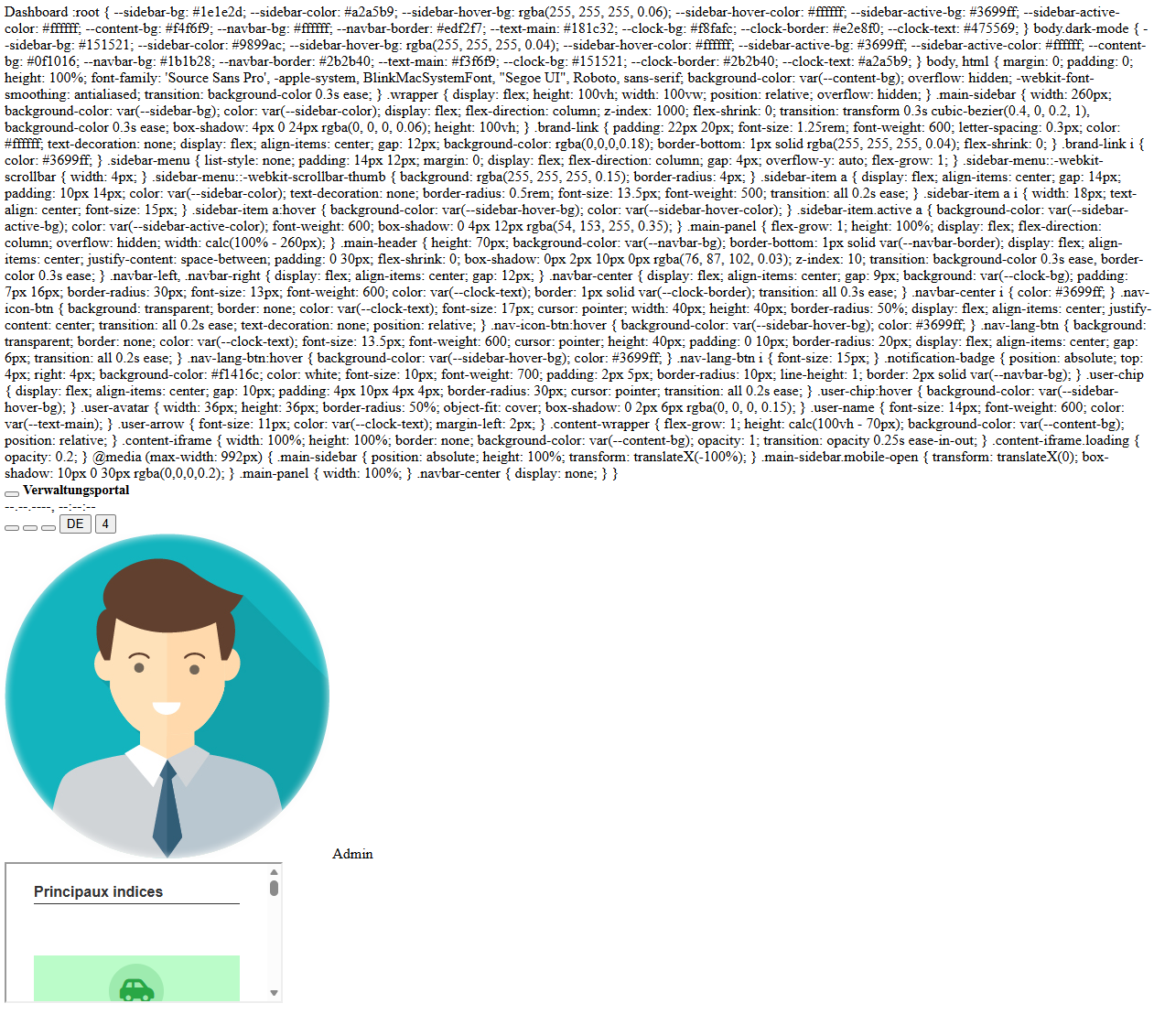
thanks a lot but somthings gone wrong.
i paste this code in onExecute but i got this screen.
and where can i write my menu.
echo <<<HTML


Dashboard :root { --sidebar-bg: #1e1e2d; --sidebar-color: #a2a5b9; --sidebar-hover-bg: rgba(255, 255, 255, 0.06); --sidebar-hover-color: #ffffff; --sidebar-active-bg: #3699ff; --sidebar-active-color: #ffffff; --content-bg: #f4f6f9; --navbar-bg: #ffffff; --navbar-border: #edf2f7; --text-main: #181c32; --clock-bg: #f8fafc; --clock-border: #e2e8f0; --clock-text: #475569; }

/* Dark Mode Variables */
body.dark-mode {
–sidebar-bg: #151521;
–sidebar-color: #9899ac;
–sidebar-hover-bg: rgba(255, 255, 255, 0.04);
–sidebar-hover-color: #ffffff;
–sidebar-active-bg: #3699ff;
–sidebar-active-color: #ffffff;
–content-bg: #0f1016;
–navbar-bg: #1b1b28;
–navbar-border: #2b2b40;
–text-main: #f3f6f9;
–clock-bg: #151521;
–clock-border: #2b2b40;
–clock-text: #a2a5b9;
}

body, html {
    margin: 0;
    padding: 0;
    height: 100%;
    font-family: 'Source Sans Pro', -apple-system, BlinkMacSystemFont, "Segoe UI", Roboto, sans-serif;
    background-color: var(--content-bg);
    overflow: hidden;
    -webkit-font-smoothing: antialiased;
    transition: background-color 0.3s ease;
}

.wrapper {
    display: flex;
    height: 100vh;
    width: 100vw;
    position: relative;
    overflow: hidden;
}

/* Sidebar Styling */
.main-sidebar {
    width: 260px;
    background-color: var(--sidebar-bg);
    color: var(--sidebar-color);
    display: flex;
    flex-direction: column;
    z-index: 1000;
    flex-shrink: 0;
    transition: transform 0.3s cubic-bezier(0.4, 0, 0.2, 1), background-color 0.3s ease;
    box-shadow: 4px 0 24px rgba(0, 0, 0, 0.06);
    height: 100vh;
}

.brand-link {
    padding: 22px 20px;
    font-size: 1.25rem;
    font-weight: 600;
    letter-spacing: 0.3px;
    color: #ffffff;
    text-decoration: none;
    display: flex;
    align-items: center;
    gap: 12px;
    background-color: rgba(0,0,0,0.18);
    border-bottom: 1px solid rgba(255, 255, 255, 0.04);
    flex-shrink: 0;
}

.brand-link i {
    color: #3699ff;
}

.sidebar-menu {
    list-style: none;
    padding: 14px 12px;
    margin: 0;
    display: flex;
    flex-direction: column;
    gap: 4px;
    overflow-y: auto;
    flex-grow: 1;
}

/* Custom Scrollbar for Sidebar */
.sidebar-menu::-webkit-scrollbar {
    width: 4px;
}
.sidebar-menu::-webkit-scrollbar-thumb {
    background: rgba(255, 255, 255, 0.15);
    border-radius: 4px;
}

.sidebar-item a {
    display: flex;
    align-items: center;
    gap: 14px;
    padding: 10px 14px;
    color: var(--sidebar-color);
    text-decoration: none;
    border-radius: 0.5rem;
    font-size: 13.5px;
    font-weight: 500;
    transition: all 0.2s ease;
}

.sidebar-item a i {
    width: 18px;
    text-align: center;
    font-size: 15px;
}

.sidebar-item a:hover {
    background-color: var(--sidebar-hover-bg);
    color: var(--sidebar-hover-color);
}

.sidebar-item.active a {
    background-color: var(--sidebar-active-bg);
    color: var(--sidebar-active-color);
    font-weight: 600;
    box-shadow: 0 4px 12px rgba(54, 153, 255, 0.35);
}

/* Main Panel */
.main-panel {
    flex-grow: 1;
    height: 100%;
    display: flex;
    flex-direction: column;
    overflow: hidden;
    width: calc(100% - 260px);
}

/* Navbar */
.main-header {
    height: 70px;
    background-color: var(--navbar-bg);
    border-bottom: 1px solid var(--navbar-border);
    display: flex;
    align-items: center;
    justify-content: space-between;
    padding: 0 30px;
    flex-shrink: 0;
    box-shadow: 0px 2px 10px 0px rgba(76, 87, 102, 0.03);
    z-index: 10;
    transition: background-color 0.3s ease, border-color 0.3s ease;
}

.navbar-left, .navbar-right {
    display: flex;
    align-items: center;
    gap: 12px;
}

/* Central Live Clock */
.navbar-center {
    display: flex;
    align-items: center;
    gap: 9px;
    background: var(--clock-bg);
    padding: 7px 16px;
    border-radius: 30px;
    font-size: 13px;
    font-weight: 600;
    color: var(--clock-text);
    border: 1px solid var(--clock-border);
    transition: all 0.3s ease;
}

.navbar-center i {
    color: #3699ff;
}

.nav-icon-btn {
    background: transparent;
    border: none;
    color: var(--clock-text);
    font-size: 17px;
    cursor: pointer;
    width: 40px;
    height: 40px;
    border-radius: 50%;
    display: flex;
    align-items: center;
    justify-content: center;
    transition: all 0.2s ease;
    text-decoration: none;
    position: relative;
}

.nav-icon-btn:hover {
    background-color: var(--sidebar-hover-bg);
    color: #3699ff;
}

/* Language Switcher Button Style */
.nav-lang-btn {
    background: transparent;
    border: none;
    color: var(--clock-text);
    font-size: 13.5px;
    font-weight: 600;
    cursor: pointer;
    height: 40px;
    padding: 0 10px;
    border-radius: 20px;
    display: flex;
    align-items: center;
    gap: 6px;
    transition: all 0.2s ease;
}

.nav-lang-btn:hover {
    background-color: var(--sidebar-hover-bg);
    color: #3699ff;
}

.nav-lang-btn i {
    font-size: 15px;
}

/* Notification Badge */
.notification-badge {
    position: absolute;
    top: 4px;
    right: 4px;
    background-color: #f1416c;
    color: white;
    font-size: 10px;
    font-weight: 700;
    padding: 2px 5px;
    border-radius: 10px;
    line-height: 1;
    border: 2px solid var(--navbar-bg);
}

/* User Profile Chip */
.user-chip {
    display: flex;
    align-items: center;
    gap: 10px;
    padding: 4px 10px 4px 4px;
    border-radius: 30px;
    cursor: pointer;
    transition: all 0.2s ease;
}

.user-chip:hover {
    background-color: var(--sidebar-hover-bg);
}

.user-avatar {
    width: 36px;
    height: 36px;
    border-radius: 50%;
    object-fit: cover;
    box-shadow: 0 2px 6px rgba(0, 0, 0, 0.15);
}

.user-name {
    font-size: 14px;
    font-weight: 600;
    color: var(--text-main);
}

.user-arrow {
    font-size: 11px;
    color: var(--clock-text);
    margin-left: 2px;
}

/* Content Area & Smooth Fade-in Iframe */
.content-wrapper {
    flex-grow: 1;
    height: calc(100vh - 70px);
    background-color: var(--content-bg);
    position: relative;
}

.content-iframe {
    width: 100%;
    height: 100%;
    border: none;
    background-color: var(--content-bg);
    opacity: 1;
    transition: opacity 0.25s ease-in-out;
}

.content-iframe.loading {
    opacity: 0.2;
}

/* Responsive Breakpoints */
@media (max-width: 992px) {
    .main-sidebar {
        position: absolute;
        height: 100%;
        transform: translateX(-100%);
    }
    .main-sidebar.mobile-open {
        transform: translateX(0);
        box-shadow: 10px 0 30px rgba(0,0,0,0.2);
    }
    .main-panel {
        width: 100%;
    }
    .navbar-center {
        display: none;
    }
}
Verwaltungsportal
    <!-- Central Live Clock -->
    <div class="navbar-center">
        <i class="fa-regular fa-clock"></i>
        <span id="liveClock">--.--.----, --:--:--</span>
    </div>

    <!-- Right Navbar Icons & User Profile -->
    <div class="navbar-right">
        <button class="nav-icon-btn" title="Suche">
            <i class="fa-solid fa-magnifying-glass"></i>
        </button>
        <button class="nav-icon-btn" title="Dokumentation">
            <i class="fa-solid fa-book-open"></i>
        </button>
        <button class="nav-icon-btn" onclick="toggleDarkMode()" title="Dark/Light Mode Umschalten">
            <i class="fa-solid fa-moon" id="themeIcon"></i>
        </button>
        <button class="nav-lang-btn" title="Sprache ändern">
            <i class="fa-solid fa-globe"></i>
            <span>DE</span>
        </button>
        <button class="nav-icon-btn" title="Benachrichtigungen">
            <i class="fa-regular fa-bell"></i>
            <span class="notification-badge">4</span>
        </button>            
        <div class="user-chip">
            <img src="[usr_picture]" alt="Avatar" class="user-avatar">
            <span class="user-name">[usr_name]</span>
            <i class="fa-solid fa-chevron-down user-arrow"></i>
        </div>
    </div>
</header>

<!-- Content Area -->
<div class="content-wrapper">
    <iframe id="appFrame" name="appFrame" class="content-iframe" src="../dash_accueil/dash_accueil.php"></iframe>
</div>
HTML;

Hi, the screenshot shows that the <style>, <link>, <title> and <script> tags were removed. Only their text content is left, which is why you see the CSS as plain text, the icons are empty boxes (Font Awesome not loaded) and the clock doesn’t run.

Please check:

  1. The code must go into the onExecute event of a Blank application (Create new application → Blank). Not in a Form/Grid/Control event and not in a label or HTML field.
  2. Run the app and press Ctrl+U (view source). Is the <style> tag there? If not, something strips it: check your security/XSS settings or paste the code again with a plain text editor (not Word or a rich text editor).
  3. Make sure you copy everything from echo <<<HTML down to HTML;. The closing HTML; must be at the very start of the line, with nothing before it (older PHP versions).

Where to put your menu: in the <ul class="sidebar-menu"> block. Each entry is one <li>:

  • Customers
  • Replace YOUR_APP_NAME with the name of your Scriptcase application (e.g. grid_customers ) and pick any icon from fontawesome.com. The app opens inside the iframe on the right. Also change the default page in <iframe ... src="../grid_objects/index.php"> to one of your apps.

    By the way, just out of curiosity: what kind of applications do you build with Scriptcase? Is it for your own company or for clients?

    hi,
    Just for me