Displaying a Column's actual Values (Not IDs)

As the title says…Currently, I have a relational database setup (which I did in MySQL). Problem now though is how do I display a column’s actual values rather than their associated IDs within a ScriptCase application. I’ve had a look within ScriptCase to see where the facility is, but couldn’t find it.

Just to reemphasise, as all my tables are linked up ? the relationships are there, but obviously I’ve got a lot of IDs in my tables ? I only want to be able to display the VALUES of those IDs (whether it’s text or numbers) rather than the IDs themselves. That’s of no use to the user.

So basically, I want to create one main table that pulls in the data from all the mini-tables whilst maintaining the relationships.
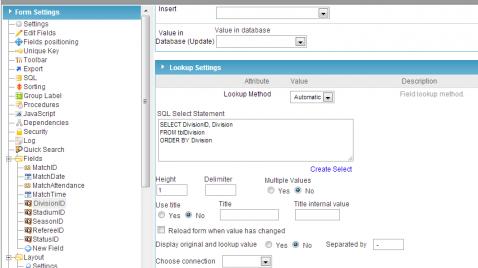
You can do it using the lookup option. Your App->Field->Lookup

You could, better you should, use the automatic lookup for the id-fields. Look at the examples …

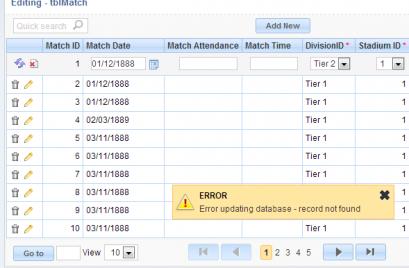
Right, I’ve used the lookup feature and managed to get the values displaying when I run the grid, however whenever I update the value of one field (in this case ‘Division’) and click the refresh button, it presents me with an error message. The screenshots below show this. What can I do to resolve this issue?

Capture.jpg

Capture2.jpg

Activate the debug option (Application / Settings) and look at the generated sql …

You need to turn on SQL debug under the application
And see what the root cause is
The error is saying it can’t find a unique record to update

Okay, done that and it comes up with this when I update the ‘Division’ to ‘Tier 2’ and click on the update row button:

It’s strange this. I can edit it perfectly in PHPMyAdmin. But can’t seem to replicate that process in ScriptCase at the moment.

Capture3.jpg

So if you copy that statement into SQL you get a count?
What this is telling me with the rollback is test it didn’t get any record

You have defined the relationships in the database, but SC knows nothing about that … Look at this sample: Klick!

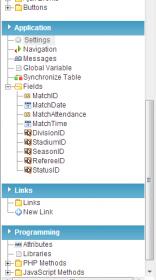
[QUOTE=RHS;13360]You have defined the relationships in the database, but SC knows nothing about that … Look at this sample: Klick![/QUOTE]Okay, thanks. However, I cannot seem to find the ‘N-N Relations’ link in the Application menu like it says in that guide. :confused:

Capture.jpg

The menu varies depending on the app (form, grid, …). What app you use?

I use ‘Form’. That’s what it says in that guide to use.

Ah, just realised you can only do it with single record forms.

Still a bit confused though because you can only set many to many relationships within ScriptCase. My database only has 1 to 1 and 1 to many relationships. That’s how I set it up in MySQL workbench anyway.