
Working on a checklist with two fields; Sequence and Description. I would like to be able to move them up and down (drag and drop) and change the value of the sequence field when moved.
Hello, I would appreciate this kind of feature or help on how this can be done within SC very much!
I have the same need, how can we push SC team to develop this function?
It’s really useful function.
YES!, this would be awesome!!!
Hi, I did it for a grid. The grid table has a field orden (order) and I added a field mover(move)
When the user drag and drop a file the grid pass the parameters to a blank_actualizar_orden and refresh

**OnScriptInit**
> ?>
> <script>
>
> function initSortableTransenvios() {
>
>     var $tbody = $(".scGridTabela > tbody");
>
>     if ($tbody.length === 0) {
>         console.log("No hay tbody todavía");
>         return;
>     }
>
>     // Si ya existe sortable, destruirlo antes de recrearlo
>     if ($tbody.data("ui-sortable")) {
>         $tbody.sortable("destroy");
>     }
>
>     // Asignar data-id a cada fila real
>     $tbody.find("tr").each(function(){
>         var id = $(this).find("span[id^='id_sc_field_idtransrep_']").text().trim();
>         if (id !== "") {
>             $(this).attr("data-id", id);
>         }
>     });
>
>     // Activar sortable
>     $tbody.sortable({
>         items: "tr:has(span[id^='id_sc_field_idtransrep_'])",
>         handle: ".handle",
>         helper: "clone",
>         tolerance: "pointer",
>
>         update: function(event, ui) {
>
>             var datos = [];
>
>             // Leer el orden REAL del DOM
>             $tbody.children("tr").filter(function(){
>                 return $(this).attr("data-id");
>             }).each(function(index){
>                 datos.push({
>                     id: $(this).attr("data-id"),
>                     orden: index + 1
>                 });
>             });
>
>             console.log("Datos enviados:", datos);
>
>             $.ajax({
>                 type: "POST",
>                 url: "../blank_actualizar_orden/index.php",
>                 data: { registros: JSON.stringify(datos) },
>                 success: function(resp){
>                     console.log("Respuesta blank:", resp);
>
>                     // Recargar la grid
>                     nm_gp_submit_ajax("recarga", "");
>                 }
>             });
>         }
>     });
>
>     console.log("Drag & drop ACTIVADO");
> }
>
> // Primera carga
> $(document).ready(function() {
>     initSortableTransenvios();
> });
>
> // Después de cualquier recarga AJAX de Scriptcase
> $(document).ajaxComplete(function() {
>     initSortableTransenvios();
> });
>
> </script>
> <?php


**onRecord**
> {mover} = '<div class="handle" style="cursor:move"><i class="fas fa-bars"></i></div>';

blank_actualizar_orden
**onExecute**
> if (!isset($_POST['registros'])) {
>     echo "SIN_REGISTROS";
>     exit;
> }
>
> $registros = json_decode($_POST['registros'], true);
>
> if (!is_array($registros)) {
>     //file_put_contents("debug_blank_json_error.txt", "JSON inválido: " . $_POST['registros']);
>     echo "JSON_INVALIDO";
>     exit;
> }
>
> foreach ($registros as $r) {
>
>     if (!isset($r['id']) || trim($r['id']) === '') {
>         continue;
>     }
>
>     $id    = (int)$r['id'];
>     $orden = (int)$r['orden'];
>
>     $sql = "UPDATE transenvios
>             SET orden = $orden
>             WHERE idtransrep = $id";
>
>     sc_exec_sql($sql);
> }
2 Likes
This is the code for a form grid editable. I added a field mover(move)
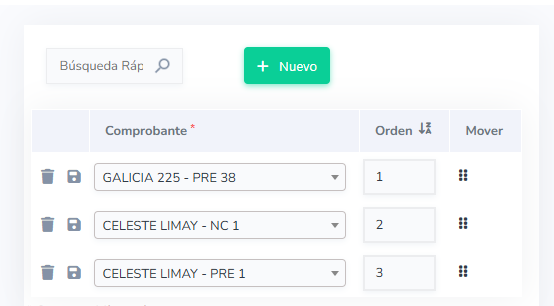
> onScriptInit
> ?>
> <script>
>
> function initSortableForm() {
>
>     var $tbody = $("#hidden_bloco_0 tbody");
>
>     if ($tbody.length === 0) {
>         console.log("No hay tbody todavía");
>         return;
>     }
>
>     if ($tbody.data("ui-sortable")) {
>         $tbody.sortable("destroy");
>     }
>
>     $tbody.sortable({
>         items: "tr[id^='idVertRow']",
>         handle: "div.handle",
>         helper: "clone",
>         tolerance: "pointer",
>
>         update: function(event, ui) {
>
>             var datos = [];
>
>             $tbody.children("tr[id^='idVertRow']").each(function(index){
>
>                 var row = $(this).attr("data-sc-row-number");
>                 var id = $(this).find("span[id^='id_read_on_idtransrep_']").text().trim();
>                 var nuevoOrden = index + 1;
>
>                 // Actualizar input real del form
>                 $("#id_sc_field_orden_" + row).val(nuevoOrden);
>
>                 datos.push({
>                     id: id,
>                     orden: nuevoOrden
>                 });
>             });
>
>             // Guardar JSON en el campo global
>             $("#id_sc_field_orden_json").val(JSON.stringify(datos));
>
>             // Guardar formulario
>             nm_atualiza('alterar');
>         }
>     });
>
>     console.log("Drag & drop ACTIVADO en FORM");
> }
>
> $(document).ready(function() {
>     initSortableForm();
> });
>
> $(document).ajaxComplete(function() {
>     initSortableForm();
> });
>
> </script>
> <?php

> onLoadRecord
> {mover} = "<div class='handle' style='cursor:grab; padding:5px;'>
>               <i class='fas fa-grip-vertical'></i>
>            </div>";
2 Likes
Hi @gbillot3
for the grid, does your implementation perform everything via ajax? i.e. the user sees and work only on the original grid?
If that’s the case I’ll copy yours, because I did something similar, but to let the users change the order I added a button that redirect to a custom blank app (that it’s used by all grids where i want to implement this reordering capability) and in this blank app the user can drag and drop records to change their order.
Hi @robydago, yes it works over the grid directly as I described.
If something not clear or not working ask me then.
Regards.