
Loading Calendar app to a specific Month/Year

Good afternoon,

Does anyone have any advice on how to load a Scriptcase Calendar app to show a previous month on load? Everything I try, the calendar ALWAYS loads the current month.

I’m at my wits end. I’ve been working on this for almost a week, and all I have to show are the lumps on my head from banging it on the wall… This seems like such a simple thing to accomplish but I’m failing miserably.

Thanks so much to anyone who can point me in the right direction.
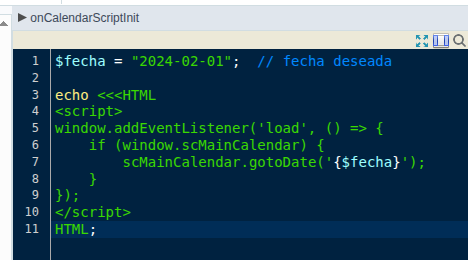
image

In onCalendarScriptInitEvent

$fecha = "2024-02-01";  // fecha deseada INITIAL DATE

echo <<<HTML
<script>
window.addEventListener('load', () => {
    if (window.scMainCalendar) {
        scMainCalendar.gotoDate('{$fecha}');
    }
});
</script>
HTML;
1 Like

Thanks so much Derazo!

I will have to give this a try the next time. I used ChatGPT to help and was able to get it working but there were a WHOLE lot more steps involved that just that code LOL. I find ChatGPT helps me out often, but at times, takes me down a rabbit hole using a lot more time that it should have =)

Thanks again very much!