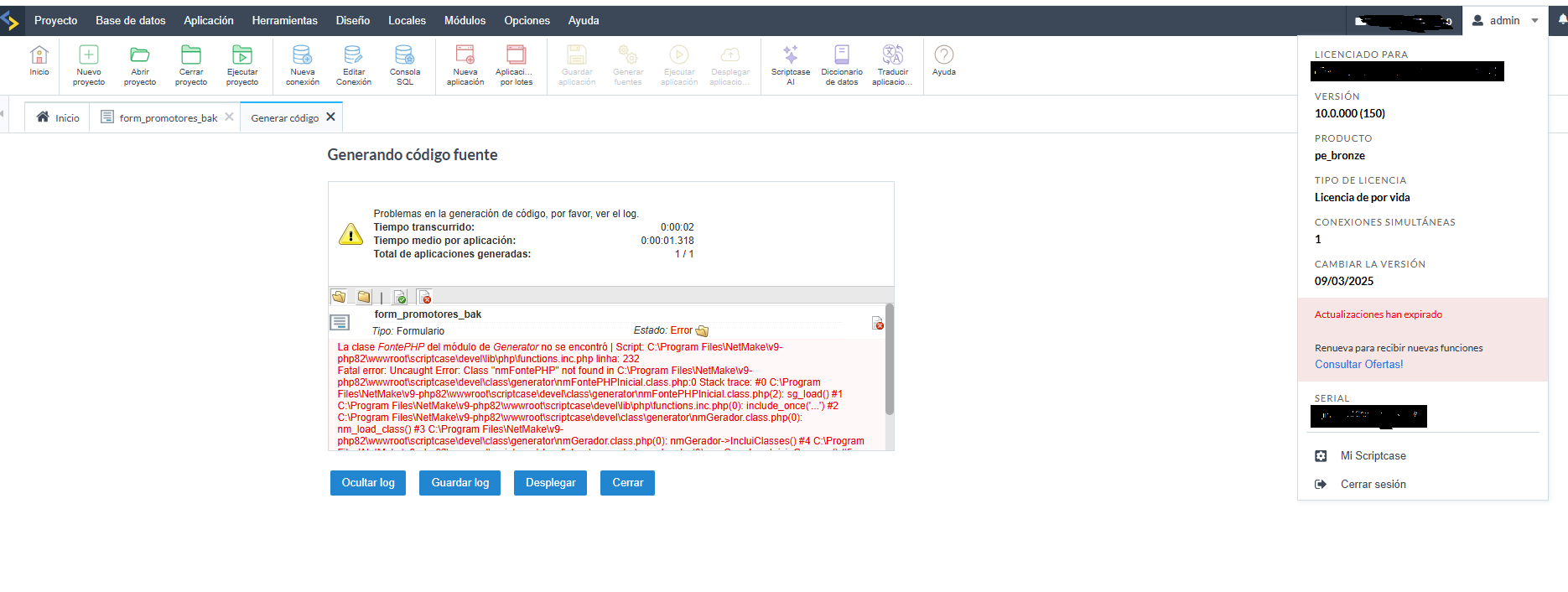
Hello Team,
my scriptcase update to version 10.
No project works anymore!
DO NOT UPGRADE!

Hello Team,
my scriptcase update to version 10.
No project works anymore!
DO NOT UPGRADE!
Yes, I have always took the risk for upgrade when new updates come available, and this time I backup the projects and upgraded, and when you try to import the project it says that the version of Scriptcase is lower that in the project, I reinstalled Scriptcase v9 and I got the same error!!!, but I moved the version in the backup (the version file) and only then I could restore my backups
If possible, please manually update your environment and let us know if the issue has been resolved.
The automatic update process is currently undergoing some fixes, and we will provide an update as soon as it is back to normal.
Best regards!
Can you explain how to manually update?
I am providing the link to the tutorial below, covering the three operating systems supported by Scriptcase.
WIN: https://help.scriptcase.net/portal/en/kb/articles/manual-update-windows
LINUX: https://help.scriptcase.net/portal/en/kb/articles/manual-update-linux
MAC: https://help.scriptcase.net/portal/en/kb/articles/manual-update-mac-os
@Danilo_Lima I followed the manual upgrade instructions and now I get a blank screen after logging into Scriptcase. Any ideas on how to fix this?
Check if it is a caching issue and test in an incognito window.
An error might be appearing in the browser console due to this cache.
Best regards!
@Danilo_Lima I ended up using the installer to install V10. I then copied the V10 zip files into the new install directory. I’m now getting the version error when I try to import my projects which I thought was resolved by the zipped files. Any idea how to fix this?
@Danilo_Lima my problem has been resolved. After I received the email this morning about an important update with release 10.0.001, I ran the upgrade process within Scriptcase. I was then able to import my V9 projects successfully and successfully generated each one including the samples project.
Still problem here
Installed v10 in another directory, import project, when I try to generate the system hangs
Thank you
@Danilo_Lima Well I spoke too soon. I just tried to log into Scriptcase V10.0.001 and now I get the blank screen after a successful login. I see the “Running version fixes patches, please wait” message. Not even the menu displays. I also tried incognito and still a blank screen. I stop/started the Scriptcase service and that did not help.
It was working fine yesterday after I ran the upgrade process to V10.0.001.
I tried again instruction received here:
I see v10 dashboard, Import project …
And nothing is working, generating, open application, NOTHING
I reverse back to version 9
Regards
Hello Team,
I fired up a new debian 12 machine,
installed scriptcase full stack from scratch,
import project
when I try to generate …
SYSTEM HANGS
Please advise,
right now I can’t update to v10
Regards
We recommend contacting the tool’s support team via chat for more detailed assistance in resolving this issue, as we have been unable to reproduce the reported freezing or malfunctions on our end.
Best regards!
Hello Danilo,
I had a remote chat session with the team.
They suggested performing a manual installation, which I had already done earlier based on your suggestion.
If I may say so, this version 10 is a disaster!
same problem did the upgrade to v 10.1 and when i l click to open the scriptcase i got the message of the new features and then blank… nothing…
right now i am trying to go back to older version… shame…
Hi everyone,
I reiterate that you can contact support directly via chat if you are still experiencing issues updating to version 10.
Our support team is available to assist specifically with matters regarding the development environment and ensuring the continued, normal operation of Scriptcase. If possible, please consider allowing remote access so the issue can be investigated further.
Best regards!
I have the same problem.
I updated from 9.13 to v10, and my projects aren’t working: the applications won’t open, and the browser freezes.
I performed a clean installation and imported my projects, but the same thing happens.