[SOLVED] ScriptCase 8 : can't center Horizontal Menu !

Hello,

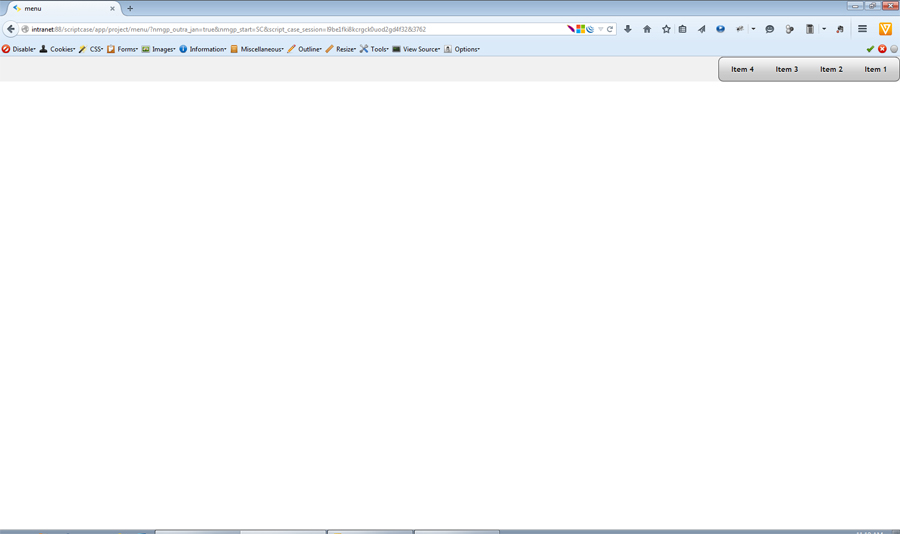
If you convert project from SC7 with Horizontal Menu , you can’t make it in center!

Also, I create new project with Horizontal Menu application, but I can’t center menu horizontally !

I tray many Menu style and theme but still I can’t center it!

Project test exported here:
https://dl.dropboxusercontent.com/u/12620465/sc8_201505101127_export_project.zip

screen shot attached!

My SC ver: 8.00.0044
Menu_Center_Bug.jpg

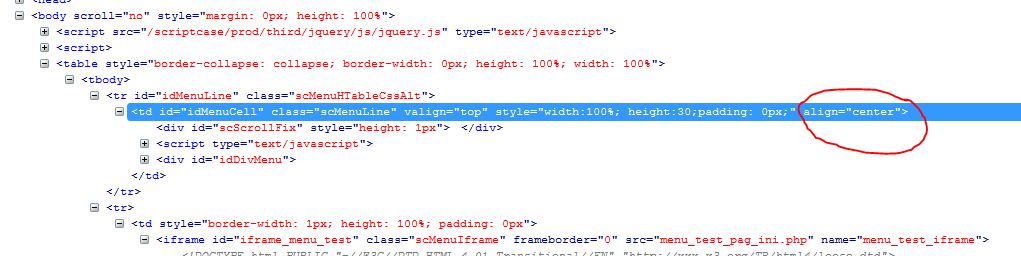
menu missing align property, it’s fixed when I add it manually !!

see attachment, and kindly add align property to id=“idMenuCell” td tag! it has only valign !

Menu_Center_Bug_missing.jpg

You need to simply override the CSS. In the menu app’s onApplicationInit event, put:

echo '<style type="text/css">';
echo '.scMenuLine { text-align: center; }';
echo '</style>';

Hi,

Do you use arabic language, right?

The bug happens when uses right to left language.
The problem already reported to our development team, when solved will be included in update release.

–
Best regard,
Netmake team

alignment_menu.png

Hello,

As Arthur said, we simulate the problem and move on to our development team fix. However, I would like to leave a stopgap solution for you.

You can use the code below in the onLoad event:


?>
       <script>
             function test() {
                  $('.scMenuHFooter').hide(); //Only if you want to not display the footer
                  $('#idMenuLine').attr('align', 'center');
             }
       </script>
<?php

Also enable footer of menu and use the code below: (Using as value)

<script>test();</script>

Thank you for cooperation!

Yes, I’m using Arabic (RTL).

John, thank you :slight_smile:

Hello,

This problem has been solved in release 8.0.045

Thank you!